Loading…
RuneLite plugin
Track your Grand Exchange flips in-game and, if you want, sync them to your Flip Goblin dashboard.
What it does
A Grand Exchange flip tracker for Old School RuneScape. It is informational only — the plugin never places, changes, or collects offers for you.
The plugin makes no network calls until you link an account. Fill capture, session profit and loss, buy limits, and asset snapshots all work locally in the client. Linking a free Flip Goblin account is the one data switch: with a token set, live market data becomes available, and your fills and assets sync to your own dashboard. The privacy policy lists exactly what is sent. Removing the token stops all of it.
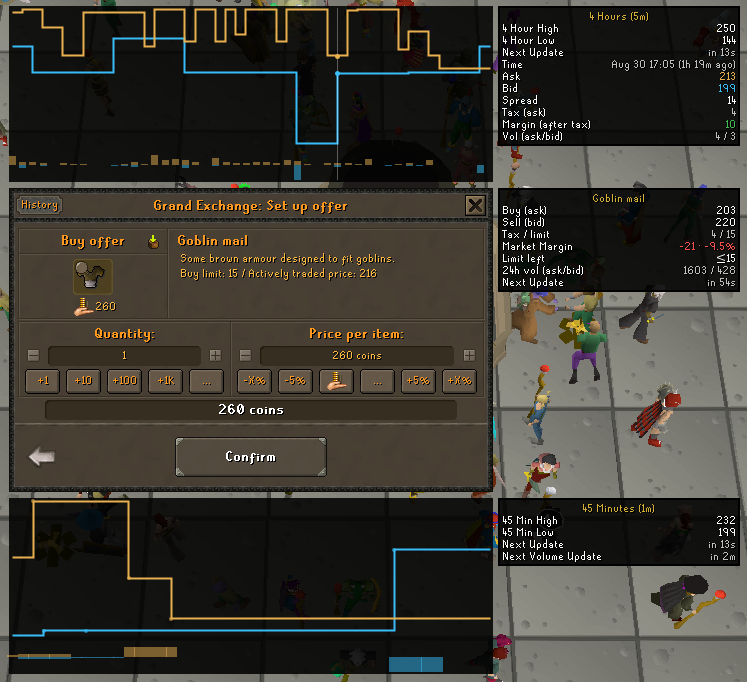
When you put in a buy or sell order, price charts wrap the GE window and an info panel sits to the right of it. Hovering the top or bottom chart shows the exact time, ask, bid, spread, and after-tax margin at that point.
Features
- Market data at the GE. Live ask and bid, the margin and ROI after tax, the buy limit, and 24-hour volume for the item you are trading.
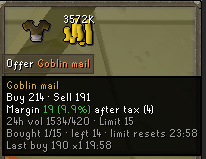
- Buy limits. The item detail panel shows how much of the 4-hour limit you have used, how much is left, and when it resets.
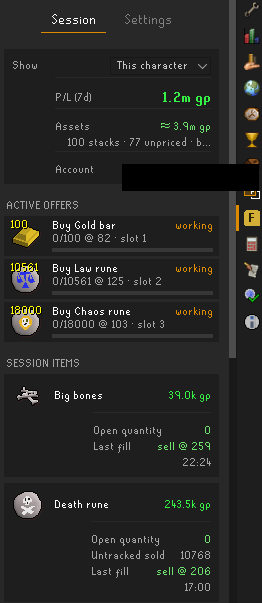
- Session tracking. Every fill is captured as it happens. The side panel shows your profit and loss after tax, a card per item, and a log of your fills. This works with no account.
- Offline fills.Fills that land while you are logged out are picked up at your next login. They are marked "(offline)" with the time window they could have landed in.
- Asset tracking. Your bank, inventory, equipment, and GE holdings are combined into one sell-now value. With an account, your dashboard keeps a history of your net worth.
- Hover tooltips. Hover any item in the GE to see its market data. An option extends this to your inventory.
Install from the RuneLite Plugin Hub
Flip Goblin is on the official Plugin Hub, so installing takes a few clicks inside RuneLite — nothing to download.
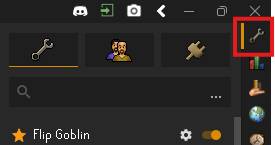
1.Open RuneLite's configuration panel — the wrench icon at the top of the right sidebar.
2. Click the Plugin Hub tab — the plug icon on the right.
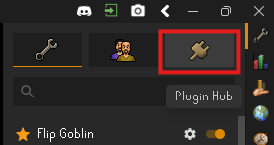
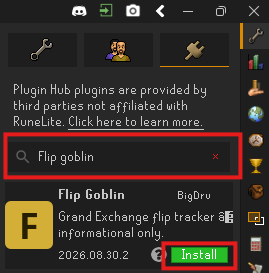
3. Type Flip Goblin in the search box, then press the green Install button on the Flip Goblin card.
4. RuneLite asks you to confirm — press Yes. This is RuneLite's standard warning for any Hub plugin that can talk to a server outside RuneLite. It lists what Flip Goblin sends once you link an account; nothing is sent before that. The full list is in the privacy policy.

5. Flip Goblin now appears in your plugin list, switched on, with its own icon in the sidebar. Then link your account below to light up market data and dashboard sync.
Updates arrive automatically through the Hub, like every other RuneLite plugin.
Link your account — one token per character
A token is a key you create here on the website and paste into the plugin. It's the plugin's one switch: with it, live prices light up at the GE, your fills and bank sync to your dashboard, and your trades help improve everyone's price data. Each character gets its own token— that's how the dashboard tells your characters apart (and it survives name changes automatically).
Link your first character
- Settings → Generate token(log in with Discord first — it's free). Copy the token — it's shown exactly once.
- In RuneLite, log in on the character you want to link.
- Open the Flip Goblin side panel(its icon in RuneLite's right sidebar) → Settings tab → paste into the token field → Link this character. Done — the GE panels show live data and your next trade appears on the dashboard under that character's name.
Good to know
- Name changes just work — the dashboard label updates on your next trade; your history stays attached to the character.
- Don't reuse one token on two characters — the dashboard would see them as one character with a flickering name.
- Unlink any time: the Unlink button in the panel's Settings tab (that character only), or revoke the token in Settings to cut it off server-side. Unlinked = zero network calls.
- Exactly what's shared while linked is listed in the token setting itself and in the privacy policy.